Save 20+ hours a monthNever miss a lead
The office runs while you're on the tools.
Quotes chase themselves, jobs land with the right person, and the invoice is built from the job before you get home.
- $149 USD/month, unlimited users
- We set it up for you
- No app store, works on any phone
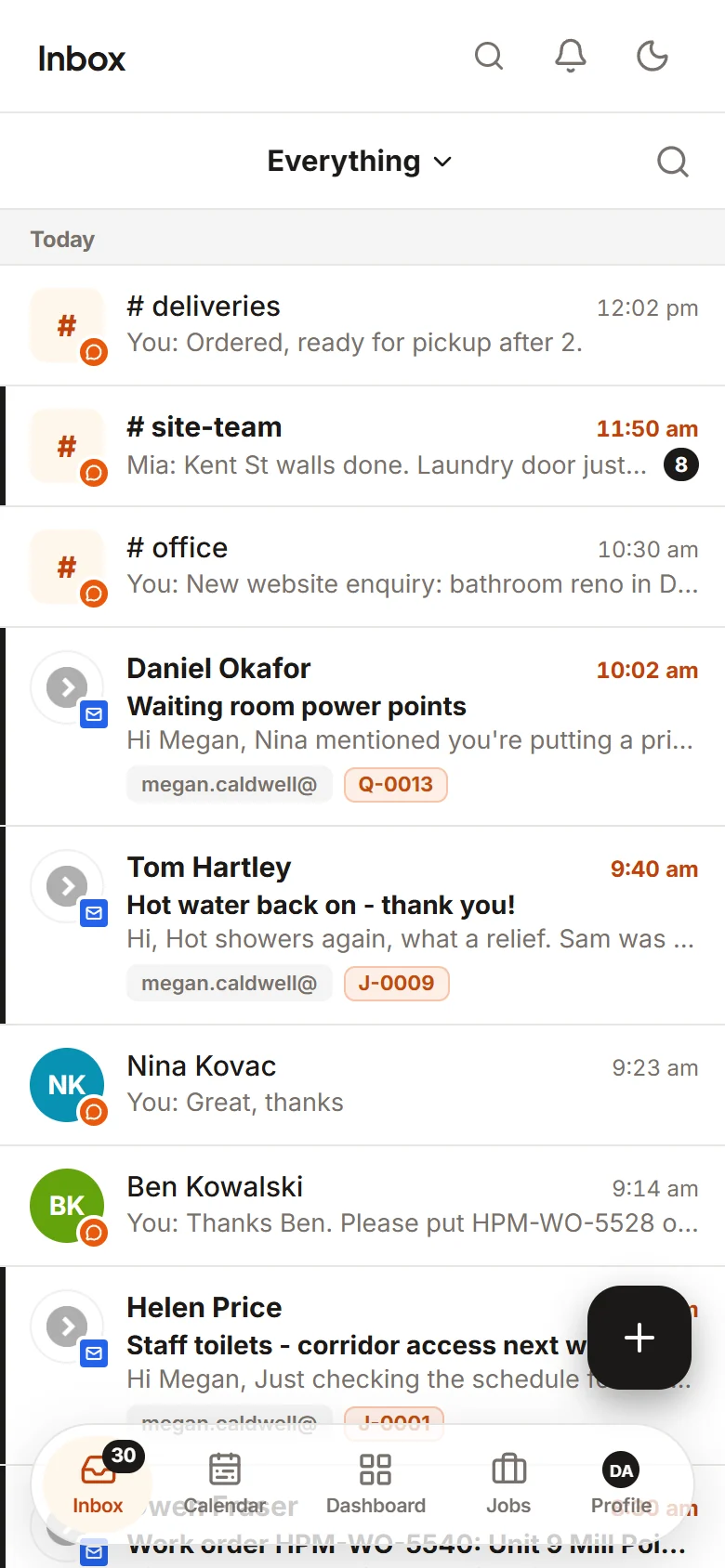
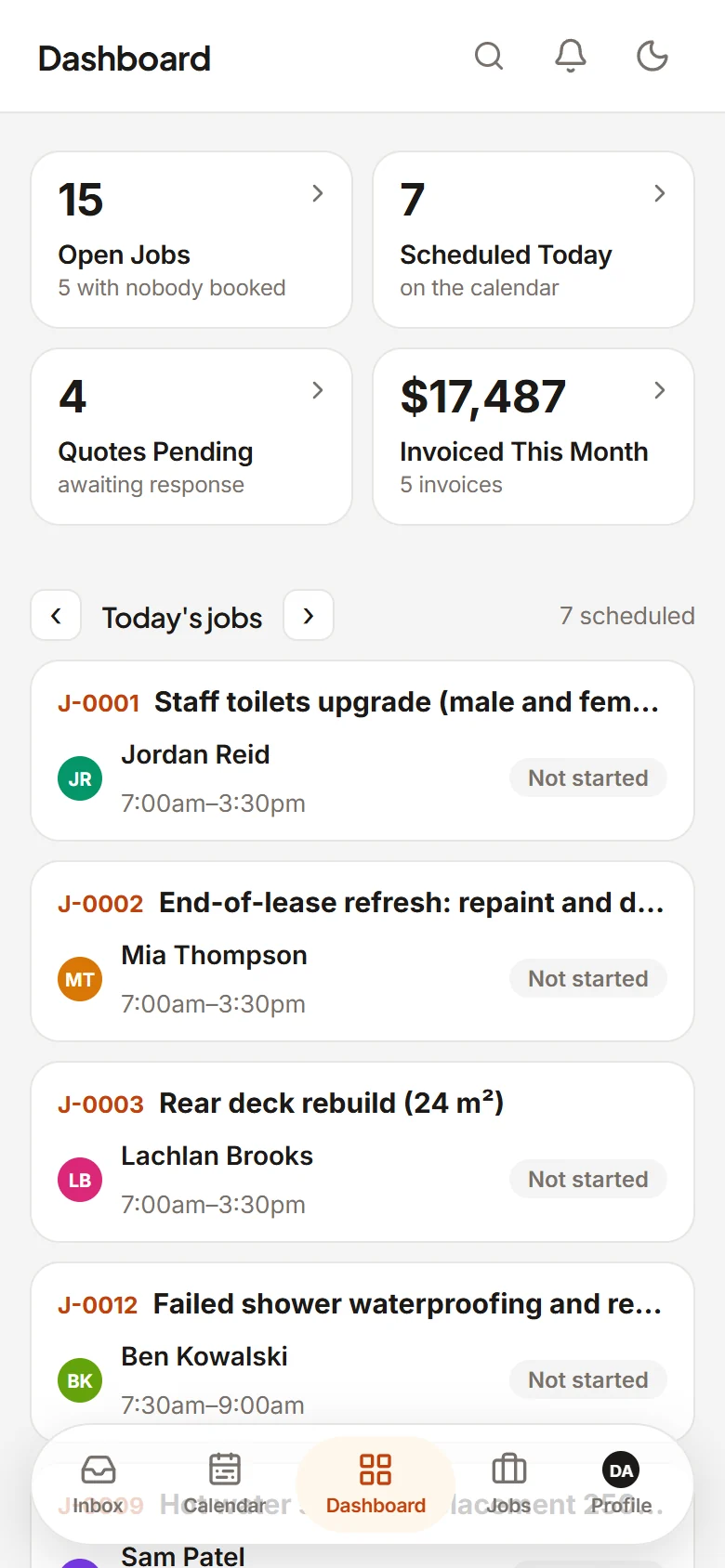
- Follow-up sent for you: Second nudge on Q-1042
- Quote accepted online: Q-1038 · $4,860. Job J-2211 created
- Smart suggestion: Dan: free at 2pm, 1.4 km away
- Checked in on site: Mia started J-2211
- Purchase order emailed: PO-318 sent to the supplier
- Invoice ready to send: INV-884 · built from today's job
- Quote accepted online: Q-1045. Thank-you email sent
The real app
The office on the desktop. Your team on their phone.
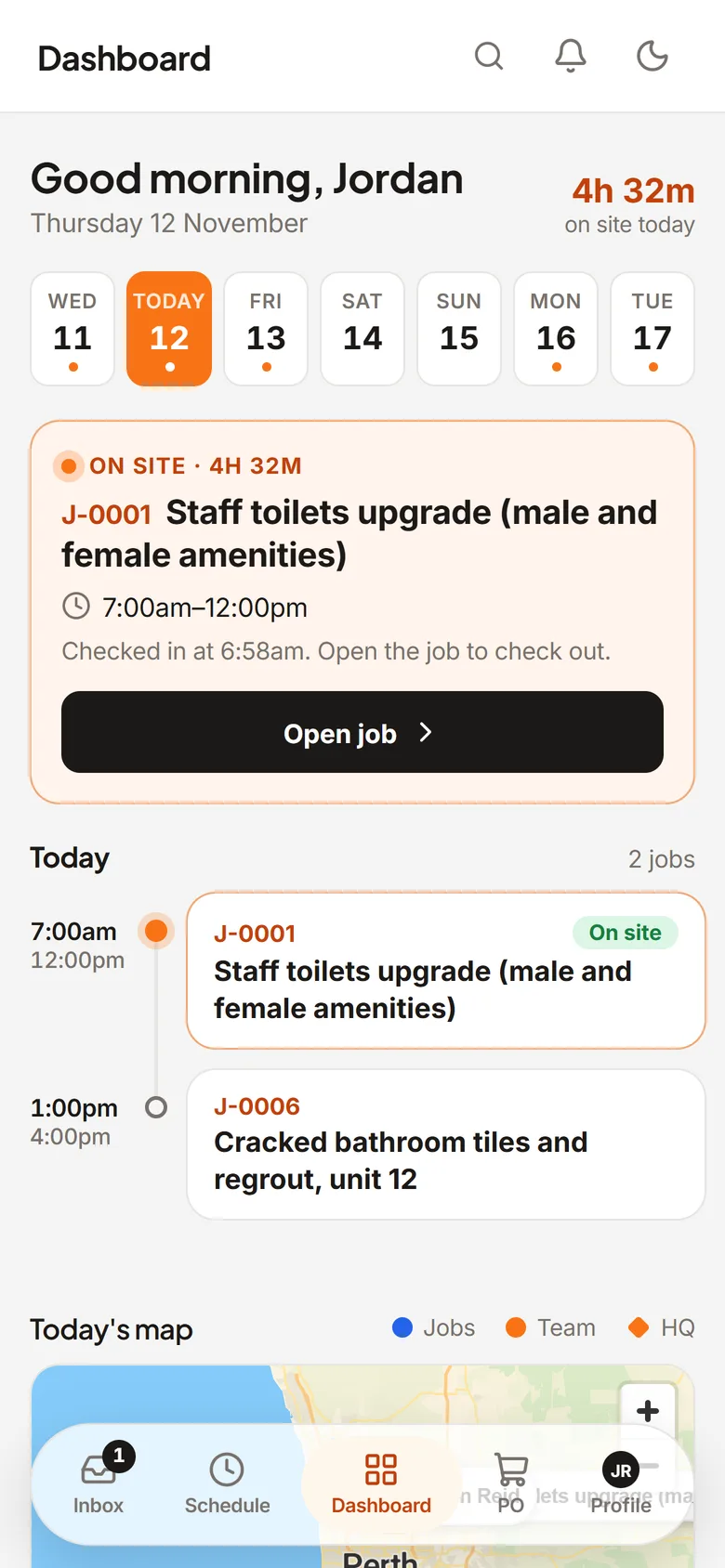
Same jobs, same schedule, live on both. Nothing to install: it runs in the browser and adds to the home screen like an app.
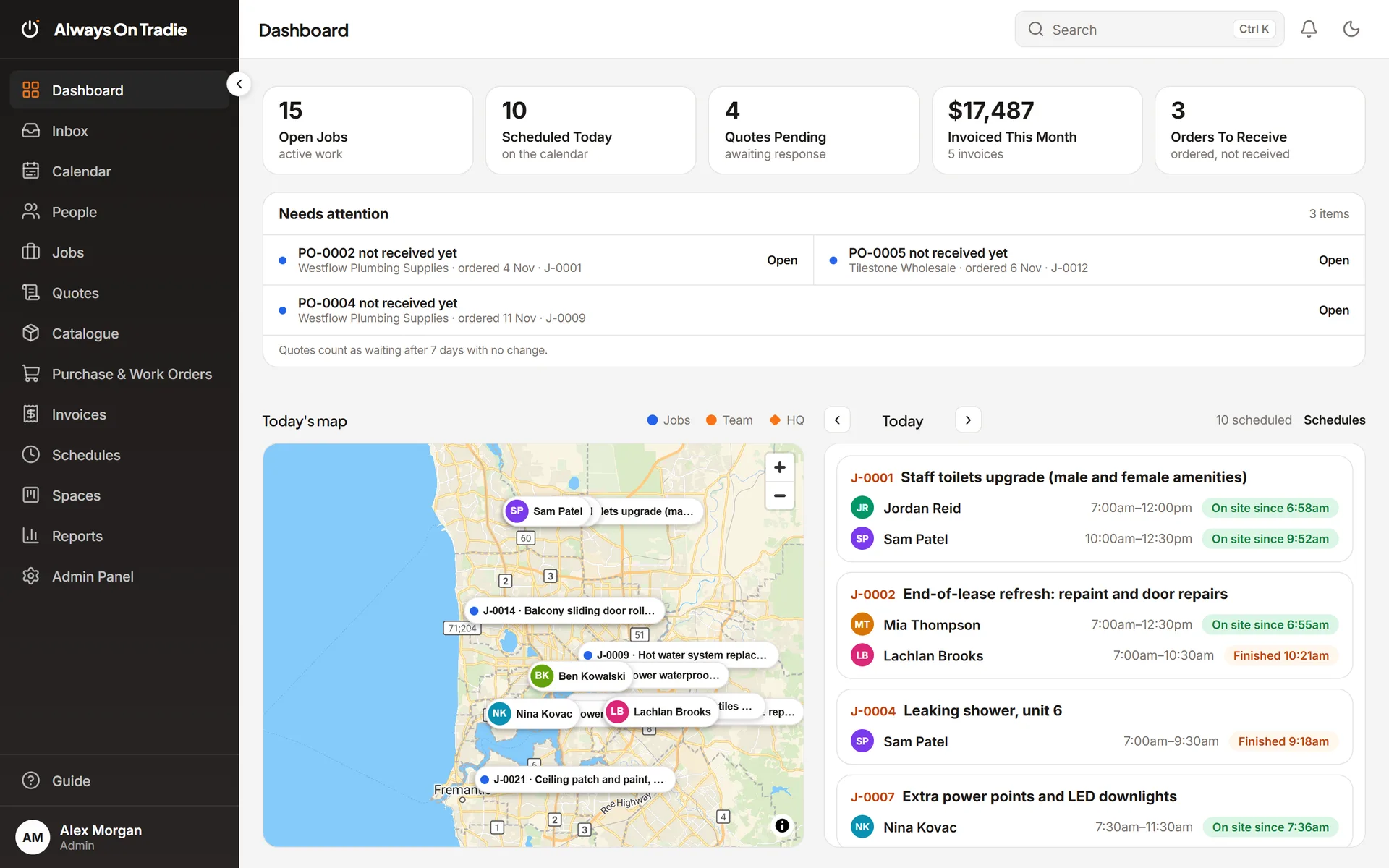
Desktop: Who's on site, what needs attention, today's map
Phone: Your crew's day, the moment they open it
Screens from a demo workspace with example data.
A day, handled
Here's what happens while you're on site.
Every one of these used to be a night at the kitchen table. Your mix will differ. The shape won't.
6:45 am
For crewsEveryone knows where they are going.
Pick a job and see who's free now, who's finishing soon and who's nearby, with a plain reason for each. Tap to book. The job lands on their phone with the address, notes and photos, and check-ins on site move it along by themselves.
~4 hrs a month backInstead of: "Who's free?" calls and texts
Schedule · Tuesday3 on todayDanMiaSamDan: free at 2pm, 1.4 km awayBook9:10 am
Solo or crewQuotes follow up without you.
Send a quote on your letterhead. Switch on the automations and the follow-ups go out from your own email in business hours. Your customer accepts online with no login, and the accepted quote becomes a job with the same lines.
~8 hrs a month backInstead of: chasing quotes and re-typing them into jobs
Q-1038 · Bathroom retileAcceptedSent, PDF on your letterheadMon 9:12 AMFollow-up from your inboxThu 10:00 AMAccepted online, PO 7781Thu 6:41 PMJob J-2211 created$4,86012:30 pm
Solo or crewMaterials ordered from the job.
Paste a supplier's product link and it fills in your price list. Raise a purchase order from the job and email it to the supplier as a PDF. Record the delivery against the job when it turns up.
~2 hrs a month backInstead of: ordering materials and chasing suppliers
PO-318 · Deck rebuildEmailed to supplierMerbau decking 90x1942 mJoist hangers24Decking screws, box of 50023:05 pm
Solo or crewThe invoice is already built.
Labour and materials land on the job as the work happens. When it is done, check the invoice and send it from your own email. Bigger jobs go out as progress claims by %, $ or the remainder.
~5 hrs a month backInstead of: building invoices from scraps of paper
INV-884 · Switchboard upgradeReady to sendLabour, 6.5 hrs$747.50Materials from the job$1,312.00Total$2,059.505:40 pm
Solo or crewOne inbox for emails + team chat
Connect Outlook or Gmail. Rules sort the inbox, every email links to the right job or quote, and voice notes from site are typed out for you. Nothing left to dig for tonight.
~4 hrs a month backInstead of: digging through the inbox for that one email
Inbox4 new, sortedCorner Cafe: repaint the shopfront?Q-1045Hot water leaking, Unit 4Assigned: SamMia: "Tiles are in, starting now"J-2211Delivery note from supplierPO-318
23 hrs
That's 20+ hours a month, back with you.
Typical monthly hours for a small trades business. Your mix will differ.
Your margins stay yours
Your team sees the job. Only you see the money.
Your crew and contractors get what they need to do the work, and nothing about what you charge. Sell prices and margins are hidden at the database level, not just on screen.
| Item | Qty | Cost | Sell | Margin |
|---|---|---|---|---|
| Hot water unit, 250L | 1 | $1,240.00 | $1,610.00 | 23% |
| Tempering valve | 1 | $96.00 | $138.00 | 30% |
| Copper pipe 15mm, 5.5m | 2 | $54.00 | $76.00 | 29% |
| Item | Qty |
|---|---|
| Hot water unit, 250L | 1 |
| Tempering valve | 1 |
| Copper pipe 15mm, 5.5m | 2 |
No sell prices or margins. Only their assigned jobs.
Your own private workspace
Other businesses never see your data, and you never see theirs.
Admin, crew or contractor
Crew and contractors only see the jobs they are assigned to.
Your email stays yours
Connect your own Microsoft or Google account. Mail goes out from your address.
Example job and amounts.
Pricing
Add your whole crew. The bill stays the same.
Per-user software charges you more every time you hire. We charge one flat monthly price for your whole team and every feature.
That's $2,532 a year back in your pocket.
Example rate. Change it to what you pay now. Prices in USD.
$149USD
per month
Unlimited users. One price for your business.
No per-user fees. Add your office, crew and subcontractors at no extra charge.
- Unlimited users, no per-user fees
- Done-for-you setup
- Quotes with automatic follow-ups and online accept
- Jobs, scheduling and dispatch
- Invoices and progress claims from the job
- One inbox for emails + team chat
- Price list, purchase orders and work orders
- Online booking page, task boards and calendar sync
Everything's included. Switch off what you don't use.
How it works
We set it up. You keep working.
Step 01
Book a call
A quick chat about your trade, your business and how you quote, book and invoice today.
Step 02
We set up your workspace
Your logo and letterhead on quotes and invoices, and your statuses ready to go.
Step 03
Invite your whole team
Office staff, crew and contractors open a link on their phone. Nothing to install from an app store.
Step 04
Run your business from it
Quotes, jobs, schedules, orders, invoices and your inbox, in one place.
FAQ
Fair questions.
Does it work for my trade?
If you quote, book jobs and invoice, yes. Electricians, plumbers, carpenters, tilers, painters, builders and more use the same tools. Your statuses and job types are set up to match how you work.
I work on my own. Is it for me?
Yes. Quote follow-ups, invoices from the job and one inbox save a solo tradie just as much time. Add people later if you grow.
Will my crew actually use it?
It runs in the browser on any phone. They add it to their home screen, see today's jobs, check in on site and add photos. It gets notifications and keeps working with a patchy signal.
Can my crew see what I charge?
No. Crew and contractors only see the jobs they are assigned to, with no sell prices or margins. That is enforced in the database, not just hidden on the screen.
Do I pay for each person I add?
No. Users are unlimited. Add your office staff, every crew member and your subcontractors at no extra charge, so nobody has to share a login.
Which email works?
Microsoft 365 or Outlook, or Google Workspace or Gmail. Your business picks one and connects it in a few clicks.
Does it handle big jobs as well as service calls?
Yes. Service jobs get a single invoice. Bigger jobs can be invoiced in stages with progress claims, by percentage, dollar amount or the remainder.
Can I turn off the parts I don't need?
Yes. Everything's included, and you can switch off what you don't use so your team only sees what matters.
How much does it cost?
$149 USD a month for your whole business. That includes unlimited users, every feature and done-for-you setup.
Save 20+ hours a month
Get your evenings back.
Book a free demo. We'll walk through your week in the app and set up your workspace for you.
Book a free demo